Showing posts with label iPhone apps. Show all posts

Friday, August 12, 2016

Free Handwriting and Yoga Story App

free apps

Here are a few free app suggestions for pediatric OTs and PTs for 8/12/16.  This week there is a pretty simple and straightforward handwriting app and an app that adds some physical activity to a child’s day – my favorite when kids are moving instead of just hunched over their devices.  (This post does include affiliate links).   So here we go:

This handwriting app is Intro to Letters, by Montessorium. It has nice, clean lines and an uncluttered background. The bonus to this app is you can record your own voice for the letters.

Yuvi – Story Aerobics for Kids includes one free video (9 minutes long) where Yuvi goes on an adventure in Africa where he has to squat down, balance and more to find hidden balls.  This app is a nice way to sneak in some fun exercise in a small space.

The post Free Handwriting and Yoga Story App appeared first on Your Therapy Source.

Wednesday, October 21, 2015

Help for App Overload


I'm not sure about you, but I am completely overwhelmed by all the apps out there.  I used to try and keep up on all the applications and tools that were available for children.  I have completely given up. In my opinion, it is impossible!  Therefore I now rely on other sources to help me keep up although I am still not keeping up..... Well anyhow here are some of the websites I count on to get my information:

1.  OTs with Apps - Carol Leynse Harpold, MS, AdEd, OTR/L, ATP  has over 30 years of experience.  The blog focuses on reviewing apps and other technologies for OT's working with children and adults.  HIghly recommend that you follow this blog - http://otswithapps.com/

2.  CallScotland.org -  This is an amazing website page that organizes apps according to different topics.  Each of the infographics are available to download as PDFs with clickable links directly to the internet.  There are free infographics on reading, communication, dyslexia, eye gaze, creativity, writing difficulties and powerpoint books.  Not all of the infographics are all about apps but they are all worthwhile to check out.

3.  SmartAppsforKids - I love this website on Fridays when they create a list of all free apps that are available for FreeApp Friday.

That's basically what I rely on and I know I don't even scratch the surface each week on exploring everything new.   Sometimes, first hand recommendations from other people on what works or what is beneficial is the best way to keep up.  I do have a Facebook page that focuses on apps if you want to follow along - https://www.facebook.com/yourtherapysourceapps

Do you have any websites to recommend that you follow to keep up with it all?


Friday, November 14, 2014

Free App Friday - Fingerfun and Toca Hair Salon Me

There are two free apps today (11/14/2014) that are worth taking a look to add to your pediatric therapy tool kit.  The first one is Toca Hair Salon Me.  Personally, I love any Toca Boca app but this one is super cute.  Kids can add their own pictures and style the hair.  The step by step actions work well in a therapy session as a motivator - if the child completes an activity they can add to the hair style.  You can download it for free today at https://itunes.apple.com/us/app/toca-hair-salon-me/id730873197


toca hair salon me

The next free app today (11/14/2014) is Fingerfun HD which is only available on the iPad.  Kids have to press all the circles on the screen at on time to reveal the picture under the circles.  It is a little tricky when many circles are on the screen so excellent motor planning and finger isolation skill practice.  The nice thing about this app is that the progression is based on how well the child complete each puzzle.  So if it is too difficult or takes too long to complete, the number of buttons decreased at the next picture.  It is available in several different languages as well.  You can download Fingerfun at https://itunes.apple.com/us/app/fingerfun-hd-multilingual/id586215504FIngerfun1

[subscribe2]

Wednesday, August 6, 2014

FREE Interactive Alphabet App

Interactive Alphabet App Visit www.YourTherapySource.com for more activity ideasSometimes a new app comes along that I have to recommend.  Interactive Alphabet is one of those apps for sure and it happens to be FREE right now (8/6/14).  This app offers so much in terms of differentiated instruction.  I know there are letter tracing apps out there but this one offers just a little something different.  For example, Interactive Alphabet includes more customization than most letter formation apps, letter sounds as you practice tracing and keyboarding practice!

www.YourTherapySource.com1.  Choices - Choose from baby where it is read to you, explore, sing, type, trace and customize.

www.YourTherapySource.com2.  Letter Tracing - fun light up letters that also speaks the letter sound as you trace.

www.YourTHerapySource.com3.  Typing - type words or customize your own words as in the picture at the top of this post.  You can type in any name or word, add your own photos and it will be saved automatically into the word list in alphabetical order.  You can record your voice speaking the word out loud as well.

In my opinion, this is a must add for a pediatric occupational therapist and it is FREE for now.  Check it out at Interactive Alphabet - https://itunes.apple.com/us/app/interactive-alphabet/id383967580?mt=8&ign-mpt=uo%3D4

One more thing - works on iPhone and iPad.


Sunday, June 1, 2014

Your Opinions on the Effects of Tablet Use on the Overall Development of Young Children

tablet effects on young childrenWe asked and 264 of you responded on what effects you think tablets and smartphones have on the overall development of young children.  Here are the highlights:

  • 61% of the respondents were pediatric OTs.

  • 53% of all respondents think that tablet/smartphone use delays social development in 0-5 year old children.

  • 36% of all respondents think that tablet/smartphone use delays speech development in 0-5 year old children (although 34% responded no and 30% responded not sure).

  • 56% of all respondents think that tablet/smartphone use delays fine motor development in 0-5 year olds.

  • 69% of all respondents think that tablet/smartphone use delays gross motor development in 0-5 year olds.

  • 46% of all respondents that that tablet/smartphone use creates behavioral problems in 0-5 year olds.


To view the complete results visit http://www.yourtherapysource.com/surveytableteffects.html

Please respond to the current survey on using social media for professional reasons.

Would love to hear your thoughts about these results...

[subscribe2]

Friday, February 28, 2014

Free App Friday - Some Fun Apps

free appsThere are a few good apps that are free today, 2/28/14.  Here they are:

iPad Screenshot 2

1.  Toca Boca Doctor:   https://itunes.apple.com/us/app/toca-doctor/id424209938?mt=8&ign-mpt=uo%3D4 - This is a great app for young children.  It challenges visual perceptual skills, visual motor skills and eye hand coordination.  It works well as a reward - complete a certain number  of tasks and the child is rewarded with a mini game that only lasts less than one minute.

iPhone Screenshot 2

2.  Creating Character in Kidshttps://itunes.apple.com/us/app/id700942891?mt=8.  I just tested this app out on the ipad and give it a big thumbs up to use as a token economy system for therapy sessions or suggest to parents.  It comes preloaded with many behavioral expectations but it has the ability to create your own goals, with your own rewards or consequences.   It may work as a great motivator for certain children to accomplish their goals.  I love all the ideas for parents to offer as rewards ie - extra hour with parents undivided attention, pick the dinner or dessert, have a chore free day, etc.  The list of consequences are also preloaded with some good ideas ie do a chore for a sibling, no electronics, write an apology letter, etc.  You can add more than one child to track progress.  


3.  Tiny Firefighters: https://itunes.apple.com/us/app/id632012899?mt=8.  For those little ones who love firefighters and police this is a cute visual perceptual app.  You could ask the child to find certain objects.  When they do and touch on the object there is some nice animation.  Again, this may be a nice reward type app or with adult guidance a visual discrimination app.

iPhone Screenshot 1


Happy Free Friday Apps!!!!!

Tuesday, February 4, 2014

Free Music and Picture Schedule App


Here is an interesting, unique app to be used as a schedule throughout your child's day. It is Everyday Grooves and is currently free. 

Basically, it is a set of songs that can used to help children go through the daily routine. There are songs to wake up, brush teeth, get dressed, take a bath, read a book, go to bed and more. You can set an alarm for each song to start playing at a certain time of day. 

This would be a fun app for those kids who love music or to song to help then stick to the daily routine. 

Free Music and Picture Schedule App


Here is an interesting, unique app to be used as a schedule throughout your child's day. It is Everyday Grooves and is currently free. 

Basically, it is a set of songs that can used to help children go through the daily routine. There are songs to wake up, brush teeth, get dressed, take a bath, read a book, go to bed and more. You can set an alarm for each song to start playing at a certain time of day. 

This would be a fun app for those kids who love music or to song to help then stick to the daily routine. 

Wednesday, January 29, 2014

Free App to Help with Self Regulation, Deep Breathing and Motor Planning


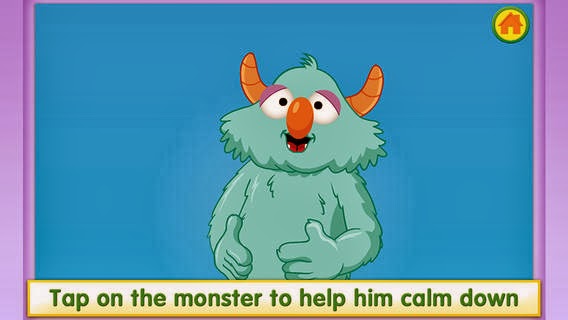
Here is a nice FREE app for little ones who needs some guidance with self regulation and motor planning.  It is called Breathe, Think, Do with Sesame Street.   

There are 5 different scenarios that include showing a monster getting frustrated with completing a skill.  The child has to tap, pop bubbles and more to help the monster calm down and think of a plan.  

The best way to check out this app is to download it and explore.  It has some great tips on teaching a child to deep breathe to calm down, to stop and think of a plan and then to act on that plan.  To me, it is like an interactive social story. 


Self Calming Strategies provides 16 helpful strategies to encourage self calming skills in children.  There are a variety of strategies offered including sensory, visual
imagery and more.   


Find out more.


Friday, January 10, 2014

Free App Suggestions for OT and PT


Here are three free apps today, mostly for the OT crew, until 10 pm at least if interested:

iPhone Screenshot 5Gappy's Mystery Letters https://itunes.apple.com/us/app/gappys-mystery-letters/id691260469?mt=8
You can practice letter formation following the dots, match up mystery letters and draw.


iPhone Screenshot 1


Counting Dots https://itunes.apple.com/us/app/counting-dots-preschool-toddler/id484775327?mt=8
Excellent basic practice for counting, visual tracking, visual motor and finger isolation skills.


iPhone Screenshot 1

Buzzlehttps://itunes.apple.com/us/app/buzzle-kids-free-educational/id452974777?mt=8
Cute app combining visual perceptual puzzles with sound


Monday, October 21, 2013

Jump Jump Froggy App for iPhone and iPad

Here is a fun FREE app called Jump Jump Froggy.  Download the app and open it up.

There are 4 ways to play -

Graph Hopper: Jump in place and it raises the graph.  Great activity to combine math (graphing) with movement!  Also, nice visual to show children progress over time with jumping skills.

Jump Jump Froggy: Jump up and down with the iPad to catch flies. Difficult to use.

 Pushing Ants: Do push ups over the iPad and it counts the push ups adding up ants.  Fun game to add some motivation to doing push ups. 

 Sit Up Snake: Do sit ups holding the iPad and the snake moves along the bottom.  Another fun visual to increase motivation to complete sit ups.

This app adds some novelty to the regular old exercise routine for kids.  The only complaint is the catching flies game - very hard to do so kids may get frustrated.  All the others are quite simple and work well.  The push up counter is really fun but just make sure the kids don't cheat on the push up form.  The sit up counter works well but many kids who receive pediatric therapy services can not do a full sit up holding an object so it will be tough. Forgot to mention the music is really peppy and fun.

If you want to race against another person there is a paid version and the other person has to have their own device.  I did not try this out.

You can watch this YouTube video to get a better idea of how the app works:

Wednesday, May 15, 2013

Another "Get Moving" App for Kids

Here is another app to add to the list to encourage physical activity in children - Big Cat Race (and its free!).  Basically you pick an avatar - lion, leopard or cheetah.  You pick a level - easy, medium or hard.  Then you pick a race - either number of steps, timed or free run.  Then get ready to race.  When the iphone says go the child runs holding the phone (the iphone screen goes black while the race is on so be sure to tell the child there is nothing to watch while they run).  Then when the race is over you get to see how long it took, how many steps you took and what your speed was.  It saves your times based on the profiles you create.  You can even play back the race and watch the animals.

This was a fun app that got a 7 and 8 year old running all over outdoors to see if they could beat the big cats.  We found that if you really want to win the race try the 10 step race.  They seemed to win that race consistently.  Occasionally they did get frustrated because they ran as hard as they could on the two minute race but did not even come close to winning when they watched it playback.  

This app certainly got the kids up and moving!   

Thursday, February 7, 2013

Tabata Timer App to Get Moving


If you follow this blog at all you know I am always on the look out for apps that get kids and adults moving.  I have been use this free Tabata Timer app for quite some time now and really like it.  Tabata is an exercise protocol based on the work of a Japanese scientist named Izumi Tabat and his colleagues on high intensity interval training.  Basically you exercise for 4 minutes going as hard as you can for 20 seconds followed by a 10 second break repeating this 8 times.  I have had great success with children combining the Tabata 4 minute exercise routine with physical activity cards.

Start out by selecting at least 4 exercises to complete (you can repeat each one twice) or pick 8 different exercises.  I use exercise cards for the children to choose the activities from.  I usually pick through the cards for what each specific child needs to work on and then allow the child to choose from that pile.  Once the exercises are chosen, if they are new I teach the child the exercise first.  If not, we get started.  Place the cards on the table and start the Tabata Timer app.  It will count down to start with three beeps.  Begin the first exercise.  As the 20 seconds counts down the timer also provides a visual image of the time elapsing along with the number count down.  For the last 3 seconds it beeps.  You then rest for 10 seconds.  Turn the first card over.  Get ready for the 2nd exercise for 20 seconds.  Repeat the process until all 8 exercises are completed in 4 minutes.

Here is what is so great about this app:
1.  Kids are much more motivated to complete the exercises.  There is a start and stop time.
2.  The visual timer of the time elapsing let's the child see that the exercise is almost completed.
3.  The rest period is just short enough for the child to be ready for the next exercise.
4.  Kids who are very hesitant to complete aerobic exercise are completing this 4 minute work out without complaint.  If I asked them to run for 4 minutes or jump rope for 4 minutes some children just would not participate. 
5.  Great little app to build endurance.  Start a session out with the 4 minute workout and finish up with a 4 minute work out. 

If you need physical activity cards, check out Physical Activity Cards and Games , Move Cards and Games and Action Alphabet. 

Wednesday, November 21, 2012

Sworkit App - Physical Activity App

If you are looking for a work out app to provide to older children who receive occupational or physical therapy check out Sworkit.  This is a FREE app on your iOs device, android device or computer.  I have been checking this app and I am very impressed for older children through adults.

Basically you choose what type of a work out you are looking for - strength training, yoga and stretching.  You choose your workout length and the area of the body you would like to exercise.  Then it is all set to go.  The timer starts and you being the exercise for the time allotted.  If you are not sure how to perform the exercise just click on the video icon and you can view a video of the exercise.

This is a wonderful to add to your collection of apps that promote physical activity.

What a simple quick brain break for the classroom as well. 

If you have a child using it, they can email you their results of how many minutes they worked out.

Want to read more?  Check out 10 Apps that Get You Moving.

Thursday, November 8, 2012

Using Metronome Apps to Teach Gross Motor Skills

Lately, I have been using a free metronome app on the iPhone to help teach gross motor skills.  There are several metronome apps so pick the one that works best for you.  I downloaded this one since it was free and it works fine for my purposes.

Basically you can set the beat on the metronome to a fast or slow speed.  The tick tock on the metronome is an excellent way to teach children stop and go, self control, rhythm and motor timing.

After setting the metronome to a slow speed I instruct the student to only step, jump or hop on the beat.   I usually put tape, circles or use a floor ladder to designate where to step or jump.  On each tick they are to jump but only on the tick. It forces the child to listen and to stop and go on a beat.  Sometimes I will also move the iPhone back and forth as it ticks to provide a visual cue along with the auditory cue.  For some children we stay at this level for awhile - practicing different skills (clapping, stepping, jumping, hopping, etc) to the beat encourages motor planning, motor timing, reflexes and self control.  When they master moving to the beat, we progress to higher level skills that require similar motor timing - ie jumping jacks, skipping and jumping rope.  The kids seem to enjoy the predictable rhythm of the metronome.  In my opinion there appears to be immediate carry over of the isolated skill to other functional skills.

Next I plan on trying to use the metronome with gait training in children with cerebral palsy to help increase cadence.  

Have you tried using a metronome to teach gross motor skills?   

Wednesday, August 29, 2012

Free Math and Movement App

Click on video below to watch
Here is another app that combines physical activity and basic math skills from PBS Kids called Fetch Lunch Rush.  This iPhone app is free and you will need to print off the pdf pages of the numbers online before you can use it.  It is a simple, fun game that gets kids moving, doing addition and using technology.

Once you print the pdf document with the numbers cut out all the numbers.  Place them around the room, gym or even outdoors, the bigger the space the more the physical activity.  Open up the app, choose the number of players, choose names to play with and you are ready to go.  Fetch will show you the orders with the simple addition problems.  You have to find the correct answer and take a picture of it to complete the order.  In each round the player fills three orders and the time is recorded.

I love this app and love this idea for many more apps!  This makes learning your addition facts so much more fun than flashcards and you are squeezing in some physical activity.  You can hang the number cards in high and low places so children have to squat down or reach up high.  Even children who were proficient in their math addition facts enjoy playing to try and beat the clock or the other players.  You can watch this short clip of a boy playing the game.


Read more about apps and physical activity

Wednesday, August 8, 2012

Movement Analysis App - Cricket Coach


Dual Screen Mode


Here is another great movement analysis app that provides various video editing tools - Cricket Coach Plus.  I tested this app which I purchased for $2.99 quite some time ago and they have since released other sports including swimming, baseball and tennis.  This app packs a lot of punch for $2.99.

Transparency Mode

Basically, you can compare videos at the same time.  You can do this by watching both videos at the same time or by overlaying the videos on top of each other.  You can slow down the videos by 50% or 75% to break down the skill even further.    


Pencil Markings

In addition, you can measure angles and write directly on the screen.  The angle measurements are not exact but you can certainly get a general idea.

I will not provide a tutorial for this app here - too long and detailed.  You really need to test and play around with the app yourself to see what would suit your needs.  The original intent of the app is for movement analysis in different sports so the app is preloaded with various cricket skills.  The purpose of the preloaded videos is to compare your form to the correct form.  I have not seen any of the other sport apps besides cricket.  I would be interested to test out others to help children with learning various coordination skills for physical education class such as throwing a ball, catching or shooting a basketball.  A therapist who works with an aquatic program may find the video modeling helpful for the various swim strokes to be able to show the student different adjustments that are necessary.

Here are a few ideas for this app:
1.  Document progress.  This is an easy way to show parents and teachers progress over time.  A picture says a thousand words, but a video shows even more.  

2.  Slow down the video for instruction.  Video tape a student doing a task ie catching a ball.  Now show the video to the student in slow motion pointing out where the student needs to initiate catching the ball.

3.  Compare videos to proper form.  Video tape a peer or adult performing the skill ie kicking a ball.  Video the student performing the skill.  Compare the videos watching them at the same time indicating to the student where they can improve parts of the skill.

4.   Document speed.  There is a speedometer on the app.  If you put in the distance the child is walking and then hit start and stop you will get an average speed.  The distance has to be at least 6 feet.

Would love to hear what others do with this app.  I think this makes a great therapy tool at a super cheap price!

Tuesday, July 17, 2012

App Review: BrainWorks for Sensory Breaks


Sensational Brain LLC has released a new app to go along with their online tools to create sensory diets.  I received a free copy to review for this blog post.  This app is quite comprehensive when it comes to creating sensory diets for home, school and the community.

If you are not familiar with the BrainWorks system, it is an online resource to create sensory diets using picture cards to help supplement sensory diets.  A tachometer is used as a visual image to help children determine if their bodies are just right, slow and sluggish, fast and stressed or fast and hyper.  This system is carried over on the app as well.

The BrainWorks app was very easy to set up.  I did watch the available YouTube videos to get a jump start but if you are comfortable with app usage you may not even need the video.  If you are a parent you will benefit from watching the videos since Gwen Wild (the creator of BrainWorks) offers some helpful tips.

Basically, you set up user accounts with appropriate activities on each account.  For this example, I set up an account for a "John Doe".  I can go into settings and deselect activities so that only the activities that are available for John can be selected.  Once that is all set the app is ready to go.  You can add other users and customize the activities for that user.

You would give the child the iOS device and he can select himself, "John Doe".  Once selected, John can choose to use the timer or not.  The next step is to choose your location (picture 1. above).  Once the location is selected John can pick how he feels (picture 2. above).  Now John can pick activities based on how he is currently feeling (picture 3. above).  For this example, the cross crawl activity was picked (picture 4. above).  You can see the timer counting down in the cross crawl activity.

I tested this app on the iPhone and the iPad.  The images shown above are all from the iPhone.  The only difference is on the iPad up to 16 activities can be shown at one time whereas the iPhone shows 4 activities at a time.

All the above features are customizable.  You can add your own activities with images from your photo library or take a picture.  You can remove any activities that are not suitable for the child on the settings page.  Also, to change the settings require a password to prevent children from altering the app once you have set it up.

Here are the pros for the BrainWorks app:

  1. Easy to set up.
  2. Many activities provided with new ones being added.
  3. Images are appropriate for all ages, not just young children.
  4. The ability to have an unlimited number of users is great for occupational therapists, teachers and parents who have more than one child with sensory needs.  You could set up different accounts for children in  the same classroom.  If a sensory break is needed the student could access an iTouch, iPhone or iPad independently and follow their own, personal sensory diet.  No printing and cutting out picture cards required.
  5. The step by step choices allow children to be more independent in following a sensory diet.
  6. You can add your own activities - if you have specialized equipment or other simple activities you can simply snap a photo and add it to the sensory diet.
  7. The timer offers nice visual support to indicate how much time is left and to help the child transition following the sensory break.
  8. This would be a great app for older elementary students through adulthood.  Once the student was instructed in how to carry out the activities, he/she would be able to carry out the sensory breaks independently.
  9. I had no problems with the app crashing - worked properly every time I tried it.
  10. It provides activities for at home, school, community and desk/table all in one location.
Here are the cons for the BrainWorks app:
  1. Although each activity has a written description in the settings section is does not show up with the picture image.  It would be helpful to have an easier way to access the written description especially when teachers or parents are supervising the sensory activities.
  2. This app would require extra instructional time for younger students to be completely independent in carrying out the sensory breaks.    
  3. The iPad version shows up to 16 activities at a time which may be too many choices although you can easily decrease the choices in the settings.  
I was financially compensated for this post but the opinions are completely my own based on  my experience.  Overall, I definitely give this app a thumbs up.  Personally, I love the features of unlimited users for pediatric therapists to be able to customize an iTouch, iPhone or iPad to share in the classroom or clinic.  It offers a wide range of activities to choose from.  In addition, the tachometer images are very helpful in reinforcing getting the body into a just right state.  It would be an even better app if the written description of the activity could pop up if necessary.  One other idea that would be great is if they added a push reminder.  Perhaps a sensory break reminder every hour for children to take a sensory break.  That would be wonderful during homework time or even for adults who need reminders to step away from their desk top work.  

Get more information about the BrainWorks app and purchase it for $11.99.  

Interested in the online version of BrainWorks?  You can get more information here about membership.     

Wednesday, May 23, 2012

3 More Tips on Using A Smartphone to Get Moving

Screenshot from Play-Move-Develop
Yesterday's blog post was on 10 apps that get you moving.  For today here are 3 more tips to encourage movement when using smart phones or tablet computers. 

1.  You Tube - There are so many exercise videos on You Tube that you can access for free.  Watch learn tai chi (wonderful for seated exercise),  learn new yoga moves or try out some popular Zumba fitness.

2.  Add ebooks to your library - Tired of carrying lots of equipment and papers?  Did you know that you can add the ebooks from Your Therapy Source to your smartphone or tablet?  Just email yourself the pdf document once you download it to your computer.  Open it up on your phone or tablet and save it.  For example you could open up Action Alphabet and follow the physical activities for all the letters of the alphabet.  Open up the Imagination Action Journeys and move through your imaginary journey.   Turn on some music and try some new dance moves with Dancing with the Owls.   Use the picture symbol cards from Mini Sensory Processing Books to allow children to choose the next activity.   Open up Roll Some Fun and use a dice app to roll the die.

3.  Screenshots - Tired of running to the copy machine to provide parents and teachers with ideas?  Tired of paying for color copies?  Use screenshots from the Your Therapy Source ebooks.  For example, open up Roll Some Fun on your iPhone.  Go to the page that you want to use.  Take a screenshot of the page.  Email yourself the screenshot.  Now you can send that page to parents for "therapy homework" or teachers for an in class movement break.  A teacher can even put it up on a projection screen (ie Smartboard) so the entire class can view it.  Want to email activities to parents?  Try Play-Move-Develop (picture above is from Play-Move-Develop).  Again, open it up on your smartphone, take a screenshot of the activity page and email it to a parent.            

Now you have a HUGE collection of sensory motor activities right on your smart phone or tablet.

Tuesday, May 22, 2012

10 Apps that Get You Moving

Here are 10 apps to get you moving with your iPhone or iPad (in no particular order).  You can click on the links to get more information about the apps.

1.   Dance Party Zoo - dance and iphone measures your rhythm.

2.  Walk N Play - track physical activity with the iPhone

3.  Footsteps - pedometer that can track gait speed and distance

4.  Move Like Me - dance steps to follow

5.  Time Motion App -  use this video app to analyze movement

6.  Using Apps to Evaluate Posture - doesn't exactly get you moving but does get you to sit up straight

7.  FitQuest - Jog, hop and duck with this app

8.  Egg and Spoon - walk with iphone trying to keep egg on spoon

9.  Short Sequence - Kids Yoga - nice images to provide as a visual


10.  Motion Maze - maze powered by your movement.

Check out tomorrow's post on more tips to encourage physical activity using your smart phone or tablet.


Related Posts Plugin for WordPress, Blogger...